UCWEB 7.6 MODDED FOR AIRTEL, RELIENCE, DOCOMO...!!!


HERE IS THE LATEST VERSION OF UCWEB MODDED FOR AIRTEL AND RIM

FOR AIRTEL USE DEFAULT MO SETTINGS............
FOR RIM USE RCOMWAP........


 http://hotfile.com/dl/99568344/3e85193/uc_relience.jar.html

http://hotfile.com/dl/99567073/9b37c9c/Uc_DOCOMO.jar.html 


http://hotfile.com/dl/99567448/68372f4/uc_airtel.jar.html 


[Read More...]


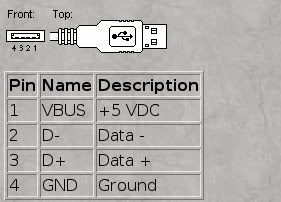
Simple way to make a USB Power supply cable for Phone Power on


Simple way to make a USB Power supply cable for Phone Power on
this is a simple way to make a USB Power supply cable for phone power on, this simple cable can help you to:
test phone it no have batry or batry it dead
unlock phone whiout wait batry to be charged
use as power supply in repair htc/samsung with jtagbox
.........

enjoy


[Read More...]


Manual GPRS & MMS Settings For Airtel, Idea, Vodafone, Tata Docomo, Reliance, Aircel, Bsnl, Uninor and Videocon


AIRTEL

AIRTEL LIVE
Account Name – Airtel live
Homepage – http://live.airtelworld.com
Username – Leave Blank
Password – Leave Blank
Proxy – Yes
Server Adress (Proxy) – 100.1.200.99
Access Point – airtelfun.com
Server Port (Proxy) – 8080
Data bearer – GPRS (Packet Data)
Authentication Type – Normal
MOBILE OFFICE
Account Name – Airtel Mobile Office
Homepage –blog.mobilerdx.com
Username – Leave Blank
Password – Leave Blank
Proxy – No
Access Point – airtelgprs.com
Server Port – 8080
Data bearer – GPRS/Packet Data
Authentication Type – Normal
AIRTEL NOP
Account Name – Airtel NOP
Homepage –blog.mobilerdx.com
Username – Leave Blank
Password – Leave Blank
Proxy – Yes
Server Address (Proxy) – 100.1.200.99
Access Point – airtelwap.com
Server Port (Proxy) – 8080
Data bearer – GPRS/Packet Data
Authentication Type – Normal
AIRTEL MMS
Account Name – Airtel MMS
Server Address – http://100.1.201.171:10021/mmsc
Proxy Address – 100.1.201.172
Proxy Port – 8799

IDEA

IDEA GPRS
Account Name – Idea Internet
Username – Leave Blank
Password – Leave Blank
Homepage – http://wap.ideafresh.com
Server Port (Proxy) – 8080
Server adress (Proxy) – 10.4.42.45
Databearer – GPRS /Packetdata
Access Point – imis
Proxy – Yes
Authentication Type – Normal

VODAFONE

VODAFONE GPRS
Account Name – Vodafone GPRS
Homepage – http://live.vodafone.in
User Name – Leave Blank
Password – Leave Blank
Proxy – Yes
Proxy Address – 10.10.1.100
Proxy Port – 9401 (or 9201)
Data Bearer – Packet Data
Packet Data Access Point – portalnmms
Network type – IPV4 (Look for it in advanced settings)
Authentication – Normal

TATA DOCOMO

TATA DOCOMO DIVE IN
Account Name – Docom Dive
Username – Leave Blank
Password – Leave Blank
Homepage – http://divein.tatadocomo.com
Server Port (Proxy) – 8080
Server Address (Proxy) – 10.124.94.7
Databearer – GPRS /Packetdata
Access Point – tata.docomo.dive.in
Proxy – Yes
Authentication Type – Normal
DOCOMO INTERNET
Account Name – Docom Net
Username – Leave Blank
Password – Leave Blank
Homepage –blog.mobilerdx.com
Proxy – No
Databearer – GPRS /Packetdata
Access Point – tata.docomo.internet
Proxy – Yes
Authentication Type – Normal
DOCOMO MMS
Account Name – Docomo MMS
Username – Leave Blank
Password – Leave Blank
Access Point- tata.docomo.mms
Homepage- http://mmsc/
Proxy – Yes
Server Address (Proxy) – 10.124.26.94
Port – 8799
Databearer – GPRS/Packetdata
Proxy – Yes
Authentication Type – Normal

RELIANCE

Reliance GSM WAP (GPRS)
APN – rcomwap
Login Request Required – off
Authentication – PAP
Data Compression – off
Header Compression – off
Settings Name – Mobile World
Home Page – http://wap.rworld.co.in
Proxy – Yes
Proxy Server Address – 010.239.221.005
Port – 8080
Username – Leave Blank
Password – Leave Blank
Reliance GSM RCOMNET
Account Name – RCOMNET
APN – rcomnet
Proxy – Leave Blank
DNS – Leave Blank
Username – Leave Blank
Password – Leave Blank
Reliance MMS
APN – rcommms
Login Request Required – off
Authentication – PAP
Data Compression – off
Header Compression – off
Settings Name – Reliance MMS
Proxy – Yes
Server Address (Proxy) – 10.239.221.5
Port – 8080
Username – Leave Blank
Password – Leave Blank
Server URL: http://10.239.221.47/mms/

AIRCEL

Aircel GPRS
Accont Name – Aircel GPRS
APN – aircelgprs
Homepage – www.techvorm.com
Proxy – Leave Blank
DNS – Leave Blank
Username – Leave Blank
Password – Leave Blank
Aircel Pocket Internet (WAP)
Account Name – Aircel WAP
APN – aircelwap
Homepage – blog.mobilerdx.com
Proxy – Leave Blank
DNS – Leave Blank
Username – Leave Blank
Password – Leave Blank

BSNL

BSNL GPRS
APN – bsnllive
IP – 10.220.67.131
Port – 8080
Homepage – http://bsnllive.in
BSNL MMS
APN – bsnlmms
IP – 10.210.10.11
Port – 8080
Homepage – http://bsnlmmsc.in
BSNL Net
APN – bsnlnet
IP – Leave Blank
Port – Leave Blank
Homepage – http://www.techvorm.com

UNINOR

Uninor GPRS
Account Name – Uninor Gprs
Username – Leave Blank
Password – Leave Blank
Homepage – blog.mobilerdx.com
Server Port (Port) – 8080
Server Address (Proxy) –10.58.10.58
Databearer – GPRS/Packetdata
Access Point – Uninor
Proxy – Yes
Authentication Type – Normal

VIDEOCON

Videocon GPRS
Connection Name – Videocon Internet
Data Bearer – Packet Data
APN – vinternet.com
Username – Leave Blank
Password – Leave Blank
Homepage – www.techvorm.com
Proxy server – Leave Blank
Proxy port – Leave Blank
Videocon WAP
Connection Name – Videocon WAP
Data Bearer – Packet Data
APN – vgprs.com
Username – Leave Blank
Password – Leave Blank
Homepage – http://wap.live.in
Proxy Server – 10.202.5.145
Proxy Port – 8799
Videocon MMS
Connection Name – Videocon MMS
Data Bearer – Packet Data
APN – vgprs.com
Username – Leave Blank
Password – Leave Blank
Homepage – http://10.202.4.119:10021/mmsc/
Proxy Server – 10.202.5.145
Proxy Port – 8799


[Read More...]


Top 10 Reasons Why Nokia Rules the Mobile Phone Market, Why Nokia is best, Why Nokia is the largest Manufacturer in the world?


Top 10 Reasons Why Nokia Rules the Mobile Phone Market


ovistoreIn spite of the presence of big names in consumer electronics like Samsung, LG, Sony-Ericsson and Motorola, Nokia really rules the mobile phone market all over the world with nearly 40% of the market share with no close competitors. Nokia is certainly the king when it comes to brand value, service and experience. The Finnish mobile giant is clearly No. 1 choice in South East Asia including India and China. How they could reach the top position? Let’s find out.

1. Call Quality

 girl_img
Nokia is known for its circuitry to handle the RF Reception and providing the best call reception quality. You won’t see users complaining much about the noise or the disturbances within Nokia phones unless its a problem of the telecom service provider. So, the primary objective of a mobile phone i.e. to serve us with better and clearer sound when we talk , is served by Nokia perfectly. And if you are a person who is accustomed to other mobile phone manufacturers, then you know that even Apple iPhone and Sony Ericsson are guilty of it.

2. Hardware

nokia6233camerasolutionlc4
You can be assured of the quality that Nokia provides in your phone hardware. The circuits are far more durable and reliable than any of the other mobile phone available in the market. I am using a single Nokia phone for 6 years and I had to take it to the service centre only once during this period for a trivial problem. That speaks for the truth I am talking about.

3. Battery

nokiabl4c
The Battery life of Nokia mobile phones is longer than many other cellphones available in the market. People who talk a lot prefer Nokia than any other brands. They always know that the battery will not run out in the middle of the call. iPhone has had this problem with battery life in the past and that hasn’t been solved yet. Nokia leaves others miles behind when we consider the longevity of the battery.

4. Robustness

Everyone knows that Nokia mobiles are truly rock solid. I want to share my experience with respect to this. I dropped my Nokia the very next day I bought it. I dropped it on the staircase and it bounced to nearly 12 steps down. My heart pumped out with the fear of losing the phone on the second day. But what I found when I reached downstairs is that the phone is fully functional and it only had a few scratch in its body. Since then, it slipped off my hand many a times but it did not refuse to function. Thanks to Nokia for making such rugged phones. It would really be the worst thing if I had to take my phone to service centre or had to buy a new one every time I dropped my phone.

5. Wide Product Range

nokia-new-upcoming-phones
Nokia has a vast and huge list of mobile phones. Nokia mobile phones are available for every consumer groups, starting from simple and durable phones for the low income groups and high-end phones for those who can afford to spend money. So regardless of you being a corporate honcho or a fresher into the world of economy, Nokia has something for you. The sheer range of products is enviable and at the same time the success mantra of Nokia’s dominance.

6. Customer Service

nokiacare
The Customer Care of Nokia which they call the Nokia Care, handles the complaints very efficiently satisfying their customers. I had a problem with the display of my Nokia Phone. I took it to the Nokia Care and they very quickly fixed it and gave it back. Its just the trust they implement on the customer’s mind, is really appreciable.
Hope you remember the battery bursting incidents of Nokia mobile phones in India. The BL-5C battery, which was the culprit in this case, was promptly replaced with no questions asked. They also helped people with a temporary site to go and put their unique manufacturing id and see if they needed to change the battery or not. Believe me, the call wasn’t that easy keeping in mind the number of battery parts they had to change.

7. Reliability

Nokia really has become a brand that people can trust upon. The error rates or crash rates of Nokia phones are very low. It will not dump you when you need this phone. And petty may this be but still, Nokia has this trust thing going in favour of it. People can blindly trust Nokia in Asian Countries. and not to mention, Nokia has deservingly earned this place.

8. Price

mobile-india
The price tags of every Nokia mobile phone is very reasonable. I mean, I can still get a GSM mobile phone for as less as Rs. 1200 in India with all the basic features and that will last long enough to pay me back with my dues.

9. Experience

Nokia is the largest cellphone manufacturer in the world with about 40% of market share with its competitors nowhere near its sales volume. They know the world of mobile phone more than any other. They have ages of experience, hundreds of success stories and dozens of smart handsets in current portfolio. That helps them to evolve and thereby nourish our needs.

10. Marketing Strategy

One of the main reasons behind the success of their mobile phones is their marketing strategy. The main source of earning is the popularity of their phones in the Asian market. China is making phone designs/softwares specific for the region. For instance, since many rural Chinese aren’t familiar with the romanized transliteration system that most cell phones use to input Chinese for text messages, Nokia developed two phones with software that lets them write characters with a stylus. And for India, Nokia launched two India-specific models, which included a flashlight, dust cover, and slip-free grip (handy during India’s scorching, sweaty summers). They also included some softwares in several regional languages which made Nokia a success.
mobile-device-market-share
[Read More...]


Airtel net on PC free mobile office


Steps to surf net on pc using mobile office.
1. Connect using access point:airtelgprs.com
2. Open mozilla firefox.
3. Goto proxy settings and put
HTTP Proxy:proxy-service.de
Port:80
4. Open 0.facebook.com
5. Now proxy-service.de will be opened automatically.
NOTE: You can use any proxy site instead of proxy-service.de like
german-proxy.de


[Read More...]


reliance fREE cALLERTUNE JUST CLICK 2 LINKS AND GET SUBSCRIBED


Hi, friendz jiska nahi ho raha hai, wo first send msg
DACT CRBT to 55333 and then visit this link,
http://ssg.wdsap.ricinfo.com/ssg?_rapsvc=90.752&_svc=90.752&aid=EN910&model=RTL&Category=-100&COS=360
Try at minus or low or zero balance,u surely get confirmation msg
,
@kkk88,try above given method, and get 2msg of unsubcription, 100% work, and if not, try this, after sending unsubsripton, for sub 30rs/30days plan free,
try this
link
then unsub. If u want, and try 1year subscription, u will succeed,

Enjoy.
Thanx,

[Read More...]


SPEED UP BSNL 3G DOWNLOAD SPEED BY CHANG PROXY NEW


SPEED UP BSNL 3G DOWNLOAD SPEED BY CHANG PROXY NEW


  PROXY-58.68.56.21  PORT-3128
[Read More...]


SPEED UP BSNL 3G DOWNLOAD SPEED BY CHANG PROXY


CONECT NET BY- BSNLNET


 AND THEN CHANGE PROXY
 USE THIS PROXY


PROXY-59.185.104.189      PORT-3128

PROXY-  61.16.247.10       PORT-3128
[Read More...]


Google Nexus S Hard Reset Instruction and Procedure


Here's the simple instruction on how to factory reset the Google Nexus S to wipe and clear all data and restore to its original factory default settings


Please be aware that the result of this process will delete all data stored from the Google Nexus S. However, this process may or may not delete the data stored on the microSD memory card. We highly advise to have back up all of your personal data first before you may proceed.

Here's how to hard reset the Google Nexus S with step by step instructions.

Do this through Menu Settings first:

1. On the Main Home Screen, select Menu
2. Select Settings, then Privacy
3. Select Factory Data Reset
4. Select Reset Phone
5. Enter the Password if prompted, then select Erase Everything

If the Google Nexus S is Frozen and the above procedure doesn't work, you may try to hard reset it through button combination.
Here's how:

1. Shut down the Power Off.Pull the battery out and reinsert it back again
2. Hold the Volume Down button
3. Press and release the Power button
4. You are now presented with a menu that allows for Fastbook, Recovery, Clear Storage, and Simlock
5. Select Clear Storage by pressing the Volume Down button
6. Press and release the Power button
7. Then confirm: Volume Up for YES and Volume Down for NO

If the above procedures doesn't work, use this other android hard reset method below,

1. Shut Down Google Nexus S

2. Now press the Volume up, Home and Power button together.

3. When the Symbol shows up release the power.

4. Then there is a boot Menu. Use the volume up/down to choose and home to select.

Once the wipe or reset process is complete, the phone will reboot to its factory fresh state. All the data stored including third-party applications will be deleted from the Google Nexus S.

[Read More...]


Circuit symbolic representation


Easy to read schematics all Electronics symbols a very useful thread to learn about electronics and mobile schematics.


For those who love their work and want to learn how to read mobile schematics

[Read More...]


BSNL 3G NEW HACKING TRICK


BSNL IS CURRENTLY BLOCKING THE SPEED AFTER RECHARGE UNLIMITED GPRS PLAN
HERE IS THE TRICK FOR AFTER RECHARGE UNLIMITED GPRS PLAN AND SPEED US 2MBPS
1.BSNL 3G NEW TRICK FOR UNLIMITED INTERNET FOR FREE
FIRST BUY 3G SIM CARD AND GET 200 MB AN 20 RS BALANCE
THEN CONVERT 2G BY RECHARGE RS-4  THEN SURF THE INTERNET
AND GPRS BALANCE IS 0 MB
THEN GOTO BSNLLIVE HOME PAGE AND ACTIVE ANY LIVE TV 1 MONTH PACK
THEN RECHARGE UNLIMITED GPRS PLAN 175 FOR UNLIMITED 1 MONTH[WHERE EVER PLAN EXIST IN YOUR AREA UNLIMITED GPRS PLAN]

APN-BSNLNET
OR-BSNLLIVE-PROXY- 10.220.67.131-PORT-8080
BSNLIVE FOR HIGH SPEED DOWNLOAD
BSNLLIVE NOT WORK IN TORRENT

NOTE-1 MONTH LATTER FIRST ACTIVE LIVE TV PLAN THEN RECHARGE UNLIMITED GPRS PLAN

PLEASE REPLAY WITH COMMENTS
[Read More...]


How to search in GOOGLE | search tips and tricks [Prateet]


Quick Tips To Search Google Like an Expert

If you use Google many times a day. Following Google search tips I actually find useful. .

Weather search:
To see the weather for many any city, type “weather” followed by the city and state, zip code, or city and country.

Time search:
To see the time in many cities around the world, type in “time” and the name of the city.

Dictionary Definition
To see a definition for a word or phrase, simply type the word “define” then a space, then the word(s) you want defined. To see a list of different definitions from various online sources, you can type “define:” followed by a word or phrase. Note that the results will define the entire phrase.

Explicit Phrase:
if you are looking for content about internet marketing. Instead of just typing internet marketing into the Google search box, you will likely be better off searching explicitly for the phrase. To do this, simply enclose the search phrase within double quotes.

Example: "internet marketing"

Exclude Words:

if you want to search for content about internet marketing, but you want to exclude any results that contain the term advertising. To do this, simply use the "-" sign in front of the word you want to exclude.

Example Search: internet marketing -advertising

Site Specific Search:
if you want to search a specific website for content that matches a certain phrase. Even if the site doesn’t support a built-in search feature, you can use Google to search the site for your term. Simply use the "site: uniquetricks.com" modifier.

Example: "internet marketing" site:http://blog.mobilerdx.com

Similar Words and Synonyms:
Let’s say you are want to include a word in your search, but want to include results that contain similar words or synonyms. To do this, use the "~" in front of the word.

Example: "internet marketing" ~professional

Sports Scores :
To see scores and schedules for sports teams type the team name or league name into the search box. This is enabled for the English Premier League, National Football League, National Hockey League, and Major League Baseball.

Book search :
If you’re looking for results from Google Book Search, you can enter the name of the author or book title into the search box and Google will return any book content it has as part of your normal web results. You can click through on the record to view more detailed info about that author or title.

Specific Document Types:
If you’re looking to find results that are of a specific type, you can use the modifier "filetype:". For example, you might want to find only PowerPoint presentations related to internet marketing.

Example: "internet marketing" filetype:ppt

This OR That:
By default, when you do a search, Google will include all the terms specified in the search. If you are looking for any one of one or more terms to match, then you can use the OR operator. (Note: The OR has to be capitalized).

Example: internet marketing OR advertising

Phone Listing:
Let’s say someone calls you on your mobile number and you don’t know how it is. If all you have is a phone number, you can look it up on Google using the phonebook feature.

Example: phonebook:617-555-1212 (note: the provided number does not work – you’ll have to use a real number to get any results).

Currency Conversion :
To use our built-in currency converter, simply enter the conversion you’d like done into the Google search box and Google will provide your answer directly on the results page.

Airline Travel Info :
To see flight status for arriving and departing U.S. flights, type in the name of the airline and the flight number into the search box. You can also see delays at a specific airport by typing in the name of the city or three-letter airport code followed by the word “airport”.

Maps:
Looking for a map? Type in the name or U.S. zip code of a location and the word “map” and Google will return a map of that location. Clicking on the map will take you to a larger version on Google Maps.

Fill in the blank :
Sometimes the best way to ask a question is to get Google to ‘fill in the blank’ by adding an asterisk (*) at the part of the sentence or question that you want finished into the Google search box.

Area Code Lookup:
If all you need to do is to look-up the area code for a phone number, just enter the 3-digit area code and Google will tell you where it’s from.

Example: 617

Numeric Ranges:
This is a rarely used, but highly useful tip. Let’s say you want to find results that contain any of a range of numbers. You can do this by using the X..Y modifier (in case this is hard to read, what’s between the X and Y are two periods. This type of search is useful for years (as shown below), prices or anywhere where you want to provide a series of numbers.

Example: president 1940..1950

Stock (Ticker Symbol):
Just enter a valid ticker symbol as your search term and Google will give you the current financials and a quick thumb-nail chart for the stock.

Example: GOOG

Calculator:
The next time you need to do a quick calculation, instead of bringing up the Calculator applet, you can just type your expression in to Google.

Example: 48512 * 1.02

Word Definitions:
If you need to quickly look up the definition of a word or phrase, simply use the "define:" command.

Example: define:plethora

Hope this list of Google search tips useful in your Google searches.

[Read More...]


.:: NOKIA ::. Nokia Universal Codes Code Description : [Mobile Rdx]


These Nokia codes will work on most Nokia Mobile Phones

(1) *3370# Activate Enhanced Full Rate Codec (EFR) - Your phone uses the best sound quality but talktime is reduced my approx. 5%

(2)#3370# Deactivate Enhanced Full Rate Codec (EFR) OR *3370# ( Favourite )

(3)*#4720# Activate Half Rate Codec - Your phone uses a lower quality sound but you should gain approx 30% more Talk Time.

(4)*#4720# Deactivate Half Rate Codec.

(5)*#0000# Displays your phones software version, 1st Line : Software Version, 2nd Line : Software Release Date, 3rd Line : Compression Type. ( Favourite )

(6)*#9999# Phones software version if *#0000# does not work.

(7)*#06# For checking the International Mobile Equipment Identity (IMEI Number). ( Favourite )

(8)#pw+1234567890+1# Provider Lock Status. (use the "*" button to obtain the "p,w"
and "+" symbols).

(9)#pw+1234567890+2# Network Lock Status. (use the "*" button to obtain the "p,w"
and "+" symbols).

(10)#pw+1234567890+3# Country Lock Status. (use the "*" button to obtain the "p,w"
and "+" symbols).

(11)#pw+1234567890+4# SIM Card Lock Status. (use the "*" button to obtain the "p,w"
and "+" symbols).

(12)*#147# (vodafone) this lets you know who called you last.

(13)*#1471# Last call (Only vodofone).

(14)*#21# Allows you to check the number that "All Calls" are diverted to

(15)*#2640# Displays security code in use.

(16)*#30# Lets you see the private number.

(17)*#43# Allows you to check the "Call Waiting" status of your phone.

(18)*#61# Allows you to check the number that "On No Reply" calls are diverted to.

(19)*#62# Allows you to check the number that "Divert If Unreachable (no service)" calls
are diverted to.

(20)*#67# Allows you to check the number that "On Busy Calls" are diverted to.

(21)*#67705646# Removes operator logo on 3310 & 3330.

(22)*#73# Reset phone timers and game scores.

(23)*#746025625# Displays the SIM Clock status, if your phone supports this power saving feature "SIM Clock Stop Allowed", it means you will get the best standby time possible.

(24) *#7760# Manufactures code.

(25)*#7780# Restore factory settings.

(26)*#8110# Software version for the nokia 8110.

(27)*#92702689# Displays - 1.Serial Number, 2.Date Made, 3.Purchase Date, 4.Date of last repair (0000 for no repairs), 5.Transfer User Data. To exit this mode you need to switch your phone off then on again. ( Favourite )

(28)*#94870345123456789# Deactivate the PWM-Mem.

(29)**21*number# Turn on "All Calls" diverting to the phone number entered.

(30)**61*number# Turn on "No Reply" diverting to the phone number entered.

(31)**67*number# Turn on "On Busy" diverting to the phone number entered.

(32)12345 This is the default security code.

press and hold # Lets you switch between lines NOKIA 5110/5120/5130/5190 IMEI number: * # 0 6 #
Software version: * # 0 0 0 0 #
Simlock info: * # 9 2 7 0 2 6 8 9 #
Enhanced Full Rate: * 3 3 7 0 # [ # 3 3 7 0 # off]
Half Rate: * 4 7 2 0 #
Provider lock status: #pw+1234567890+1
Network lock status #pw+1234567890+2
Provider lock status: #pw+1234567890+3
SimCard lock status: #pw+1234567890+4 NOKIA 6110/6120/6130/6150/6190 IMEI number: * # 0 6 #
Software version: * # 0 0 0 0 #
Simlock info: * # 9 2 7 0 2 6 8 9 #
Enhanced Full Rate: * 3 3 7 0 # [ # 3 3 7 0 # off]
Half Rate: * 4 7 2 0 # NOKIA 3110 IMEI number: * # 0 6 #
Software version: * # 0 0 0 0 # or * # 9 9 9 9 # or * # 3 1 1 0 #
Simlock info: * # 9 2 7 0 2 6 8 9 # NOKIA 3330 *#06#
This will show your warranty details *#92702689#
*3370#
Basically increases the quality of calling sound, but decreases battery length.
#3370#
Deactivates the above
*#0000#
Shows your software version
*#746025625#This shows if your phone will allow sim clock stoppage
*4370#
Half Rate Codec activation. It will automatically restart
#4370#
Half Rate Codec deactivation. It will automatically restart
Restore Factory Settings
To do this simply use this code *#7780#
Manufacturer Info
Date of Manufacturing *#3283#
*3001#12345# (TDMA phones only) This will put your phone into programming mode, and you'll be presented with the programming menu.
2) Select "NAM1"
3) Select "PSID/RSID"
4) Select "P/RSID 1"
Note: Any of the P/RSIDs will work
5) Select "System Type" and set it to Private
6) Select "PSID/RSID" and set it to 1
7) Select "Connected System ID"
Note: Enter your System ID for Cantel, which is 16401 or 16423. If you don't know yours,
ask your local dealer for it.
8) Select "Alpha Tag"
9) Enter a new tag, then press OK
10) Select "Operator Code (SOC)" and set it to 2050
11) Select "Country Code" and set it to 302 for Canada, and 310 for the US.
12) Power down the phone and power it back on again
ISDN Code
To check the ISDN number on your Nokia use this code *#92772689# .:: Ericsson ::. Ericson T65 *#05# Fake Insert puk screen Press no to exit Ericsson T20
Ericsson T20

MENU tecnichal Info
[type] >*<<*<* Displays :
1] Info service
1] Info SW
2] Info hardware
3] SIMlock
4]setup

2] Service setup
1] Contrast 3]Service Test
1] Display
2]Leds
3]Keyboard
4] ringer
5] Vibration
6]Headset
7] Microphone
8]Clock
4] Names List
MENU info
[Type] >*<<**<
Network and Subnetwork : NCK and NSCK Ericsson T28 >*<<*<* menu Tecnichal info
SW vers. and name list
>*<<**< menu Personal Info
Network and Subnetwork : NCK and NSCK
<> are the right and left menu's keys Ericsson T18s/T10/A1018s >*<<*<* software
CXC125065 Internal product code
PRG
970715 1515 Software version and SW rev.
<* CLR <><**
<> are the right and left menu's keys
!!!><**
Control /Enable SIM Lock!!! Ericsson R310 Technical Info : >*<<*<*
Options :
1) service Info
info Software
Simlock
Configuration 2) Service Test
Display
Led/Illumination
Keyboard
ringer
Vibration
Headset
Microphone
Clock
3)Text's name List
Info personal : >*<<**< SIM Locking ( 8 digits' code ) ( it could harm your phone )
1) Network
2) Subnetwork
3) SP
4) Corporate
.:: Siemens ::. Siemens C25 IMEI number: * # 0 6 #
Software version: put off sim card and enter: : * # 0 6 # and press LONG KEY
Bonus screen: in phone booke: + 1 2 0 2 2 2 4 3 1 2 1 .:: Bosch ::. IMEI Number: * # 0 6 #
Dafault Language: * # 0 0 0 0 #
Net Monitor: * # 3 2 6 2 2 5 5 * 8 3 7 8 # .::Alcatel ::. IMEI number: * # 0 6 #
Software version: * # 0 6 #
Net Monitor: 0 0 0 0 0 0 * .:: Samsung ::. Samsung SGH600/2100DB IMEI number: * # 0 6 #
Software version: * # 9 9 9 9 # albo * # 0 8 3 7 #
Net Monitor: * # 0 3 2 4 #
Chaning LCD contrast: * # 0 5 2 3 #
Memory info: * # 0 3 7 7 # albo * # 0 2 4 6 #
Reset pamieci (SIMLOCK`a removing!!!): *2767*3855#
Reset pamieci CUSTOM: *2767*2878#
Battery state: * # 9 9 9 8 * 2 2 8 #
Alarm beeper: *#9998*289#
Vibra test: *#9998*842# .:: Dancall ::. IMEI number: * # 0 6 #
Software version: * # 9 9 9 9 # .:: Philips ::. *#3333*# Displays the blocking list.
*#7489*# Displays the security code.
*#06# Displays the IMEI number.
*#8377*# Displays the SW info. .:: Panasonic ::. Panasonic gd90 gd93 *#9999# SW - Type the code on switch on , during network seek
-Vers. SW and production code
Enable ringing and vibration contemporarily
Enable vibration with # then increase volume with "tone menu " Panasonic gd70 *#9999# SW - Type the code on switch on , during network seek
-Vers. SW and production code
Enable ringing and vibration contemporarily
Enable vibration with # then increase volume with "tone menu " .:: Acer ::. Acer V 750 *#400# Display Adc/ Set Cal-Value -
*#402# Set LCD Contrast
*#403# Display Errors Info
*#300# Display Info Hw & Sw
*#301# Menu Test
*#302# Menu Acoustics
*#303# (Settings saved) Set English language?
*#307# Menu Engineering
*#311# Reset Phone Code - [ Also reset Security Codes ! ]
*#330# (Execute not success) [ unknown ]
*#331# (Service deactivated) [ unknown ]
*#332# (Service unavailable)[ unknown ]
*#333# (Execute not success)[ unknown ]
*#351# (Service unavailable) [ unknown ]
*#360# (Invalid input)[ unknown ]
*#361# (Invalid input) [ unknown ]
*#362# (Invalid input) [ unknown ]
*#363# (Invalid input) [ unknown ] .:: Genie ::. Genie DB *#06# IMEI.
*#2254*# Near Cell Mode. For every received BTS will be displayed :
Current channel and 2 channel levels
*#06# IMEI
*#2558# time of network connection ( D/H/M )
*#2562# Fores reconnection to network
!!!*#7489# Dispalys and modify phones' security code!!!
!!!*#3377# SIM lock information !!!
*#7378# SIM card Informations : supported phase name and tipe
*#7693# Enable/disable "Sleep Mode"
*#8463# State of "Sleep Mode"
*#2255# Debug Call Mode enable/disable
*#3333*# Displays the blocking list.
*#7489*# Displays the security code
*#06# Displays the IMEI number
*#8377*# Displays the SW info. .:: NEC ::. NEC db2000 *#2820# software vers.
IMEI *#06#
Reset *73738# (send?)
SP Lock info:
* # 3210 # (send?)
Network barring info : *#8140# (send?)
( it could harm your phone )
SIM lock it could harm your phone )
*#4960 # (send?) -Inquiry * 4960 * password * password # (send?) lock
#4960* password # (send?) unlock
[password] [8 digits]
Net Lock
*#7320# (send?) -Inquiry * 7320 * password * password # (send?) lock
#7320* password # (send?) unlock
[password] [ 8 digits]
Net Lock 2:
*#2220# (invio) - Inquiry * 2220 * password * password # (send?) lock
#2220* password # (invio?)unlock
[password] [8 digits]
Unlock subnetwork
*#1110# (send?) - inquiry * 1110 * password * password # (send?) lock
#1110* password # (send?) unlock
[password] [nĂ¯¿½ 8 cifre]
( it could harm your phone ) .:: Trium ::. Trium Geo/Geo @ - Astral - Cosmo -Aria Enter the menu and type *
A new menu will be displayed :
Application : SW version and battery's voltage

Trium Galaxy
Push * and type 5806: Production date and SW version .:: Telit ::. Telit GM 810 MONITOR - technical menu - : type ++++ and push OK.
Adiacent cells list : # and *
Now if you push OK the phone displays battery ' s voltage and temperature .:: Sagem ::. Sagem MC959/940 Select commands' menu and push *
Displays a new menu' :
Appli : software vers. and battery's voltage
Eprom
Sim Lock
Test LCD: display test , green/red and vibration Sagem MC920 Select commands' menu and push *
Displays 5 new menus : 1 APPLI
VERSION ( SW)
BATTERY (voltage )
2 PROM (IMEI)
3!!! SIM LOCK (10 digits code requested ) !!!
4- NETWORK (returns : OPTION NOT AVAILABLE)
5- TEST LCD
SYMBOL 1 (LCD)
SYMBOL 2 (test2 LCD)
BLACK (all icons and carachters displayed )
FOR PHOTO (welcome message and time )
VIBRATOR (vibration test )
.:: Sony ::. Sony CMD Z5/J5 Vers. SW :
Without SIM , switch on phone and type l *#7353273# .:: Eprom ::.
!!! Sim Lock [10 digits code ] ( it could harm your phone )
NETWORK : OPTION NOT AVAILABLE
Test LCD: display test of the green/red leds and vibration
Push * and type 4329 :enables/disables network monitor 1 (the same of MT35)
Push * and type 621342 :enables/disables network monitor 2
Push * and type 5807 : Serial Number Software Vers.
Push * and type 936505: IMEI -- Software Vers.
TPush * and type 547 : Test serial Data Cable DISPLAYS :"Testmode"
Push * and type 362628: ISMI BLOCK (UNKNOWN)
Push * and type 476989: NS BLOCK (UNKNOWN)
Push * and type 482896:CP BLOCK (UNKNOWN)
Push * and type 787090: ? BLOCK (UNKNOWN)
Push * and type 787292 : block current network
!!! Push * and type 967678: SP LOCK!!!
Push * and type 850696:Warm Start ( ENABLE/DISABLE)
Push * and type 3926 : Swicth off phone
Push * and type 5806: Production date and SW version .:: Motorola ::. Motorola V3688 IMEI *#06#
Enhanced Full Rate Codec EFR
Enable EFR : [][][] 119 [] 1 [] OK.
disable EFR : [][][] 119 [] 0 [] OK .:: Tips and Tricks ::. Send an E-mail from your GSM From your telephone you can send an email to whichever E-mail customer of the Internet network. The e-mail will be sent to the maximum of within an hour from the reception.
The sended message will contain in luminosity the telephone number of the sender. In order for sending e-mail, send an SMS with this syntax (always separated by spaces):
EMA name@domain text-of-your-email Example: in order to send an email to john@doe.com, do the following:
EMA john@doe.com text-of-your-email if your phone cant print @ replace it with a !
EMA johon!doe.com text-of-your-email And then send this message to the folloving number: +39 338 8641732
Free SMS Center numbers
From your telephone you can send SMS messages of 160 char. max. to another GSM phone Your message will be sent through an SMS Center (usually the one that gave your provider)
You pay a little fee depending of your provider, BUT YOU WILL HAVE TO PAY something In order for sending SMS without paying anything, you got to change your SMS Center number with these one
+491722270300 or +358405202999 or +352021100003 Codes (that they dont tell you in the manual) To check the IMEI (International Mobile Equipment Identity) type: *#06# Information you get from the IMEI:
XXXXXX XX XXXXXX X
TAC FAC SNR SP
TAC = Type Approval Code (first 2 digits = country code). FAC = Final Assembly Code (For Nokia phonfiltered=10).
SNR = Serial Number. SP = Spare (always SP=0).
To check the phone's software (firmware revision information) type: *#0000# ( or for some phones outher then Nokia 61XX you can try *#model nummber# ex. for 8110 *#8110#) Information you can get from the phone's software version:
V 3.14
28-11-97
NSE-3
1st line: Software version.
2nd line: The date of the software release.
3nd line: Phone type, .

Some versions and dates: V 3.14 28/11/97
V4.33 11/03/98 V 4.73 22/04/98
V 5.24 14/9/98 Pin-Out Diagram for the 6110 1 - VIN CHARGER INPUT VOLTAGE 8.4V 0.8A
2 - CHRG CTRL CHARGER CONTROL PWM 32Khz
3 - XMIC MIC INPUT 60mV - 1V
4 - SGND SIGNAL GROUND
5 - XEAR EAR OUTPUT 80mV - 1V
6 - MBUS 9600 B/S
7 - FBUS_RX 9.6 - 230.4 KB/S
8 - FBUS_TX 9.6 - 230.4 KB/S
9 - L_GND CHARGER / LOGIC GND Revealing Headphone and Car-Kit Menus Think about this: If you do these tricks the new menus can not be erased after the procedure. But it's not dangerous or harmful for your phone To enable the headset-function, you have to short-circuit the "3" and "4". After a short time there is "Headset" on the display Now, menu 3-6 is now enabled!
To enable the carkit-function you have to short-circuit the "4" and "5". After a short time, "Car" is shown on the display and the menu 3-7 is enabled!! This Trick is for you how want to hear more then your supposed to ! If you short-circuit the left and the right contact with the middle contact ("3", "6" and "9") the Nokia Software hangs! The profile "Headset" will be activated. Before you do this, just active the "auto call receive" function in the headphone profile and set the ringing volume to "mute" Now you can use your phone for checking out what people are talking about in a room. Place the phone somewhere stratidic and call your phone! The phone receives the call without ringing and you can listen to what people are talking about! .....gr8... Serial numbers on your 6110 For more info type: *#92702689#
The first screen gives you the serial and IMEI number.
Then there is the Date of Manufacture: ex. Made 1297
Then there is the Purchasing Date: ex. Purchasing Date 0298
Then there is the last Repair Date: ex. Repaired: 0000 Note: you must turn off the phone to exit after this test, because of the last function, "transfer user data" which doesn't work as "standard"....You can use this mode only to transfer all Calender, Profile and Callers Group Information to another phone (eg. if you are replacing phone or configuring phones for use within your company or when a particular phone doesn't works correctly )
Activating and deactivating EFR and HFR, on your 6110 *3370# to activate Enhanced Full Rate - Makes calls sound better, but decreases the battery life by about 5%. #3370# to deactivate Enhanced Full Rate
*4720# to activate Half Rate Mode - Drops call quality, but increases battery life by about 30%. #4720# to deactivate Half Rate Mode

[Read More...]


Recent Comments

Our New Site
www.MobileRdx.com

Popular Posts

Return to top of page Copyright © 2010 | Platinum Theme Converted into Blogger Template by HackTutors